How to Complete Your VIDIZMO Registration
When a portal administrator invites you to join a VIDIZMO portal, you receive a confirmation email. You must complete the registration process to access the portal.
To learn about inviting users, see How to Add New Users to a Portal.
Complete the Registration
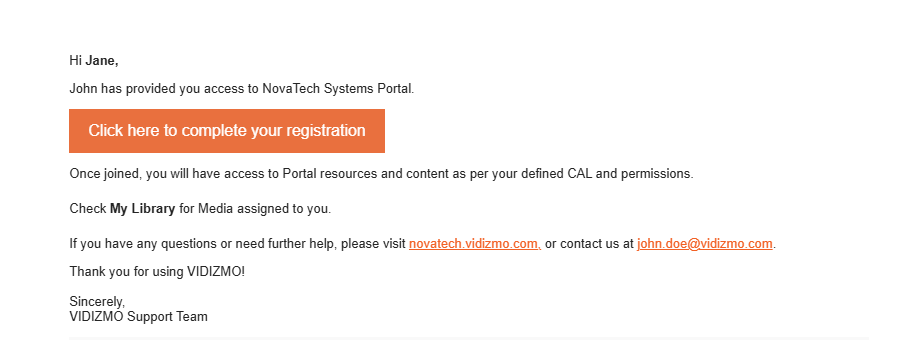
- Open the registration email you received.
- Select Click here to Complete your registration.
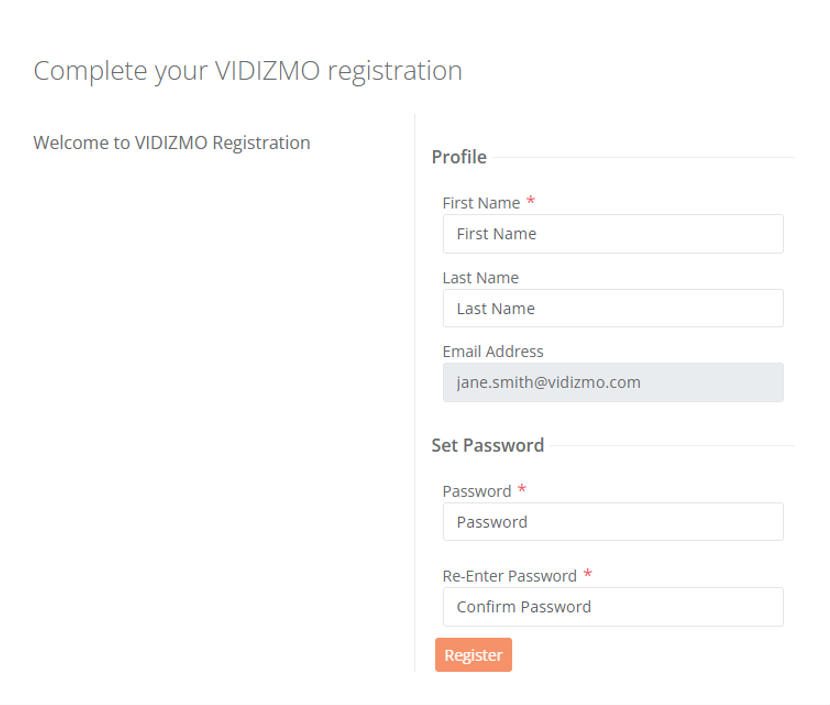
- On the registration form, enter your First Name (required).
- Enter your Last Name.
- Verify your Email Address (this field is pre-filled and cannot be edited).
- Enter a Password that meets the portal's password policy requirements. Common requirements include:
- Minimum 8 characters
- At least 1 uppercase letter
- At least 1 number
- At least 1 special character
- Enter the password again in Confirm Password.
- If GDPR is enabled on the portal, select the checkboxes to accept the Privacy Policy and Terms of Use.
- Select Register.
After successful registration, a confirmation page appears with a link to the login page. Select the link to sign in with your new credentials.
NOTE: Registration links expire after 24 hours. If your link has expired, contact your portal administrator to resend the invitation.